
Updated November 2026 · Written and maintained by the Progression Agency strategy team
Progression Agency provides UI/UX design services for mobile apps and web applications: research, user flows, wireframes, high-fidelity interface design, prototypes and design systems, delivered by the same team that can build the app. The work ranges from full user experience design services on a new product to a user interface design service for a single app. Some need user experience design consulting for a product that already exists, others bring in user interface design consultants to polish screens, and most want one UX and UI design company that carries research through to a shipped product.
UI/UX Design from Progression.
Get your exact price in a free proposal, usually the same business day.
Get a free proposalOn this page · 16 sections
- What is UI/UX design?
- What a UX strategist decides before screens are designed
- UI/UX design services
- What should a Figma app design file contain before the build starts?
- How is Figma website design different from designing an app?
- Do you need a Figma web design before the site is built?
- Key features and components
- Common integrations
- Accessibility and platform guidelines
- Our UI/UX design process
- How to design a mobile app around one main task
- How much do UI/UX design services cost?
- Technology we typically use
- Mistakes to avoid
- Why choose Progression Agency for UI/UX design?
- Related services
The short answerUI/UX design is the work of deciding what an app does on each screen (UX: flows, structure, content) and how it looks and responds (UI: layout, type, color, components), tested with real users before engineering starts. A UI/UX design engagement for a business app commonly costs $8,000-$40,000 as a price figure; a full design system for a product $25,000-$80,000.
Cost ranges are US market price bands, not quotes.
What is UI/UX design?
UI/UX design is the discipline that turns a product idea into screens people can use: UX covers research, flows, structure and usability; UI covers the visual layer, from layout and typography to the component library engineers build from. When the job you would give a UI design firm is a refreshed look or a component library for flows that already test well, our designers restyle those screens on the existing journeys and test the new visual layer with users before engineers build it.
Design and engineering are separate skills but one process; our designers sit with the developers who will build the screens, so what is designed is what ships. See mobile app development and web app development.


What a UX strategist decides before screens are designed
Before any wireframe exists, someone has to tie the product’s business goal to what users are trying to get done, pick the few journeys that decide whether the product succeeds, and set the measures that will show it worked, such as task completion, time to first value or drop-off during signup. That is the UX strategist’s job, and skipping it spreads design effort evenly across screens that matter unequally.
At Progression Agency, research and the business goal shape which journeys get wireframed and tested first, so visual design starts on the flows that carry the most weight for that particular product.
UI/UX design services
Projects we are most often asked to build.
Mobile app UI/UX design
iOS and Android app design to Apple’s Human Interface Guidelines and Google’s Material Design, with platform-native patterns. Gaming UI UX design adds menus, inventory and store screens that have to read at a glance mid-session, so we test them with the game running. Our mobile UI UX design services also cover the states a static mockup tends to skip: empty screens, error messages, slow connections and the permission prompts iOS and Android show before the camera or location turns on. For the full handover set, screens, specs and store art, see our mobile app design company page. For a screen by screen look at what good looks like, from launch to settings, see our guide to the best app design.
Web app and dashboard design
Web-based app design for portals, SaaS products and internal tools: dense data, roles and responsive layouts. UI web app design for these products is mostly about hierarchy: what the user sees first, what can wait behind a filter, and how a table stays readable as its columns multiply.
UX research and usability testing
Interviews, task-based tests and analytics review that show what users do rather than what they say. Methods, participant numbers and what each round returns are set out on our page on usability testing services.
Prototyping
Clickable prototypes in Figma to validate flows with users and stakeholders before code. In UI UX design for AI, the prototype matters even more, because streamed answers, wrong results and the path back to a human all have to be tried out with real users. Most prototypes start as gray box screens with notes attached, and our page on app design wireframes follows one booking flow through every pass.
Design systems
Tokens, components and documentation so every new screen is consistent and faster to build. Before hiring an interface design company, ask to see the token and component documentation from one past handover, because a system nobody wrote down leaves every later screen to be redrawn by hand. Variables, modes, slots and library publishing are set out layer by layer in our guide to building a Figma design system.
UX audits and redesigns
A structured review of an existing app’s flows, accessibility and conversion, with a prioritized fix list. When you redesign an application that people already use, releasing the new screens in stages, starting with the flow where the audit found the biggest drop-off, lets you trace any change in completion to one release.
A structured review of an existing app’s flows, accessibility and conversion, with a prioritized fix list.
What should a Figma app design file contain before the build starts?
Every screen in every state, built from a shared component library, with real copy and notes on behavior. A file that shows only the happy path leaves engineers guessing at empty lists, loading states, error messages and what happens on a slow connection. Portfolio shots can pass for top app design while the file behind them stops at the main screens, so ask any studio you are weighing to open one real project file and walk through its edge states.
Structure matters as much as the pictures. Components with a variant for each size and state, auto layout so frames resize the way the code will, and color and spacing variables named the way developers name them let engineers read exact values in Dev Mode instead of measuring by eye. Well-run UI UX development services depend on that tidiness, because a clean file turns into code with far fewer questions.
Accessibility belongs in the file as well: contrast checked on every text style, focus order and screen reader labels noted on interactive elements, and a dark version wherever the product supports one. Our UI UX design and development services keep designers and engineers on the same team, so those notes are read and questioned by the people who will build from them.
How is Figma website design different from designing an app?
A website file is organized around pages and breakpoints rather than screens and states. Each page is drawn at desktop, tablet and phone widths, long pages are assembled from reusable sections a marketer can reorder, and every section is mapped to the CMS fields an editor fills in, so your team can publish a new landing page from approved parts.
Search and load speed get settled in the file as well: one H1 per page, heading levels that follow the content, alt text noted beside each image, and image sizes chosen with page weight in mind. The same team that designs the file builds the site, whether it goes to Webflow, WordPress or a React framework, so your product and its marketing site share one design system.
Do you need a Figma web design before the site is built?
For any custom site, yes. Moving a section inside a Figma frame takes minutes; moving it after the CMS page layouts are coded means rework in code, content fields and testing. Settling layout, real copy and every breakpoint in a Figma web design first lets the build start from decisions that are already approved.
The review itself works best as a clickable prototype opened on a phone and a laptop, with comments left directly on the frames and sign-off given page by page. Changes inside an existing design system, such as a new pricing table built from approved components, can go straight to the browser, because the parts were already agreed.
Key features and components
What separates a useful build from a costly one.
| Feature | Why it matters |
|---|---|
| User research first | Designs solve real problems |
| Platform guidelines | Feels native, passes review |
| Accessibility (WCAG 2.2) | Usable by everyone |
| Prototype testing | Problems found before code |
| Design tokens | Consistent, themeable UI |
| Component library | Faster engineering |
| Developer handoff specs | No guesswork in build |
| Analytics hooks | Measure after launch |
Common integrations
Where the value usually comes from.
| System | What we connect |
|---|---|
| Design tools | Figma, FigJam |
| Prototyping | Figma prototypes, ProtoPie |
| Research | Maze, UserTesting, session replay |
| Analytics | GA4, Mixpanel |
| Engineering | SwiftUI, Jetpack Compose, React |
| Accessibility | WCAG 2.2, VoiceOver, TalkBack |
Accessibility and platform guidelines
Good design is design that works for every user and passes store review. Game UI UX design raises that bar in its own way: text size, colorblind-safe signals and remappable controls decide whether some players can play at all. Control size is one of the first checks in app user interface design: Apple lists 44 by 44 points as the default control size on iPhone and iPad, and Android’s accessibility guidance recommends touch targets of at least 48 by 48 dp, so an icon that looks tidy in a mockup can still be hard to hit. Products that people speak to as well as tap get their own treatment in our page on voice user interface design, from prompts to error recovery.
- Interfaces follow the Apple Human Interface Guidelines and Material Design 3 where each platform expects it.
- Color contrast, touch targets, focus order and screen-reader labels are designed to WCAG 2.2 AA.
- Text scales with system font settings; layouts are designed for the largest accessibility sizes, not only the default.
- Privacy prompts, permissions and account deletion flows are designed in from the start.

Our UI/UX design process
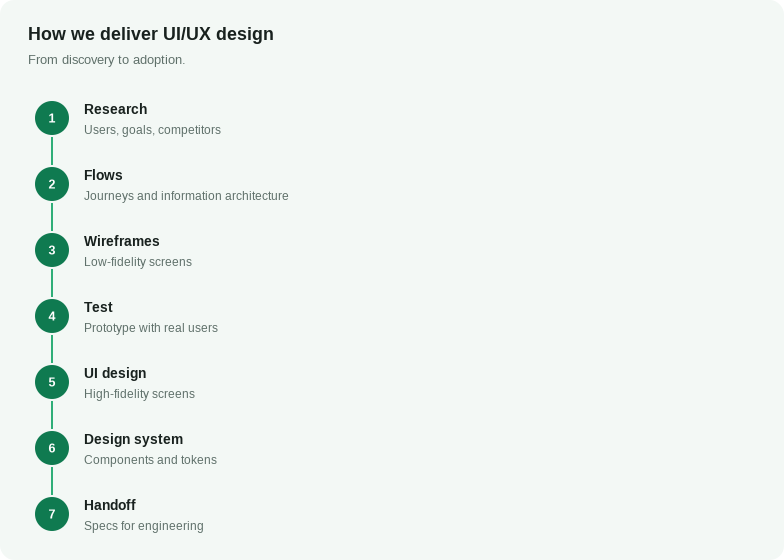
We start with research and the business goal, map the user journeys, wireframe and test the core flows, design the high-fidelity screens and design system, then hand off specs and components to engineering, staying involved through build and launch. If you hire a UI designer separately, give them the tested wireframes and user journeys first, since visual polish on an untested flow can make a weak journey look finished.
Software UI UX design for tools people use all day
Someone who spends six hours a day in a product wants speed over charm. Keyboard shortcuts, remembered filters, bulk actions and clear recovery from errors matter more than first-run polish. We watch long-time users work and count the steps in their most frequent tasks before changing anything. A redesign that looks fresher but moves every button can cost your customers a week of lost pace.
How many people should a user experience design agency recruit per round?
Five usually do it, with a separate round for each distinct kind of user. Jakob Nielsen has long advised that five people surface most of a design’s usability problems, and that three small rounds with fixes in between teach more than one large study.
The count grows when audiences behave differently. A marketplace used by buyers and sellers, or a clinical tool used by nurses and patients, needs a small round for each side, because the five-person rule holds only for people who use the product in similar ways. Who you recruit matters more than how many: five real customers reveal more than a room full of colleagues.
A top UX design company reports each round as a short list of problems ranked by severity, with the clip that shows each one and the change it proposes, then retests the changed screens in the next round, so findings shape the prototype before production code exists.
How to design a mobile app around one main task
Start from the single job a person opens the app to do and draw that path first. When you design a mobile app, that path needs every state it can land in: empty, loading, offline and error. Navigation follows from how often people move between areas, and the main actions should sit within thumb reach on a large phone. Platform habits come next, because iOS and Android users expect navigation, sharing and permission prompts to behave the way their phone taught them. App layout design then fixes a grid and spacing scale that holds from a small phone to a large one, so each screen keeps its order of importance at every size.
Handoff is where designs drift, so keeping designers available through engineering is what makes a UI UX app development agency different from a studio that stops at the Figma file. Questions about spacing, states and behavior then get answered by the person who drew the screens.
Usability testing for mobile applications on real phones
A mobile prototype clicked on a laptop hides the problems a phone exposes: a thumb covering the very button the task needs, a keyboard hiding the next field, text too small at arm’s length. A useful round puts the prototype on each participant’s own device and asks for the main task one-handed.
Phone sessions need conditions a desk lacks: a notification arriving mid-task, a stretch on a slow connection, and the camera or location prompt, since a denied permission can leave the next screen empty. Participants’ own handsets also bring enlarged text settings and older models into the test, which a single lab phone would miss.
How much do UI/UX design services cost?
At market rates, a UX audit commonly costs $3,000-$8,000, the UI/UX design of a business app $8,000-$40,000, and a full product design system $25,000-$80,000, depending on screens, platforms and research depth.
| Scope | Typical range | Timeline |
|---|---|---|
| UX audit and fix list | $3,000-$8,000 | 1-2 weeks |
| App UI/UX design (one platform) | $8,000-$25,000 | 3-6 weeks |
| App UI/UX design (iOS + Android + web) | $20,000-$40,000 | 5-8 weeks |
| Product design system | $25,000-$80,000 | 6-12 weeks |
Get a free proposal with your exact price, usually the same business day.
Technology we typically use
Mainstream, maintainable choices.
| Layer | Choice |
|---|---|
| Design | Figma |
| Prototyping | Figma, ProtoPie |
| Research | Interviews, Maze, analytics |
| Handoff | Figma Dev Mode, tokens |
| Accessibility | WCAG 2.2 checks |
| Engineering | Same team builds it |
Mistakes to avoid
Common causes of overruns and low adoption.
- Designing screens before defining the user’s core task.
- Skipping prototype testing to save a week.
- Copying a competitor’s interface without its context.
- Ignoring platform conventions on iOS or Android.
- Treating accessibility as a final check.
- Handing off pictures instead of specs and components.


Why choose Progression Agency for UI/UX design?
Engineering, design and go-to-market in one team.
- Designers and engineers in one team, so designs are buildable and built as designed.
- Research and testing before high-fidelity work.
- Design systems that make every later feature cheaper.
- You own the code, data and accounts.
- Headquartered in New York City, working with clients nationwide and worldwide.
As a user experience design firm, Progression Agency hands over the research findings along with the screens and the Figma files, so the reasons behind each flow stay with your product team when the next feature is designed. A UI UX design firm worth shortlisting can show the research notes behind one past project, not just its final screens, and those notes reveal whether each flow was tested with users or guessed.
Related services
See mobile app development, web app development, how to choose a product design agency and how to build an app.
Ready to scope it?
Tell us the users, workflow and systems involved. We will propose a first release and price estimate.
UX design agency, UI UX design agency or UX agency: which one you need
A UX design agency researches how people use a product and designs the flows, structure and interactions; a UI design agency designs how it looks and feels; a UI UX design agency does both, which is what most products need because the two are inseparable in practice. A UX agency that only produces research decks leaves the build to someone else; one with product designers and developers carries the work into shipped screens.
UI UX design services at Progression Agency run from New York for web and mobile products across the United States and worldwide: research and testing, information architecture, flows and wireframes, visual design systems, prototypes and developer handoff, measured in activation, task completion and conversion rather than deliverables. Fintech, SaaS, healthcare and ecommerce products each get their compliance and platform constraints handled in the design. Healthcare UX design leans on plain-language consent, forgiving forms and clear rules about who can see which record, tested with the clinicians and patients who will actually use the product. Many teams call this product design user experience, and treating it as one discipline keeps the screens, the flows and the engineering constraints in the same conversation from the first sketch. Fintech UX design adds another kind of pressure: identity checks, disclosures and error states have to be clear enough that a customer never wonders whether money has moved. UX design for e commerce concentrates on search, product pages, the cart and checkout, where a small point of friction shows up directly in completed orders.
What is the difference between a UX design agency and a UI UX design agency?
A UX agency designs flows and structure from research; a UI UX agency also designs the visual interface; most products need both together.
Does your UX agency also build?
Yes; designs are carried through prototypes and developer handoff, or built by our development team.
What a SaaS UI UX design agency works on
Brochure sites never meet the problems a SaaS UI UX design agency handles: onboarding that gets a new account to its first useful result, dense tables and filters, role-based screens and settings that multiply with every release.
The strongest SaaS interface work sits on a shared component library, so a new feature inherits spacing, states and behavior instead of reinventing them. Ask any team you shortlist how they measure activation and how they keep the design system current as the product ships.
How do you measure UI UX design services?
Activation, task completion, error rates and conversion on the shipped product.
Want the Progression Method applied to your business? It’s proprietary and reserved for clients. Get a free proposal
Frequently asked questions
What is a UI/UX design service?
How much does UI/UX design cost?
How long does app UI/UX design take?
What is the difference between UI and UX design?
Do you design web-based apps as well as mobile apps?
Do you follow Apple and Google design guidelines?
Can you redesign an existing app?
What do you deliver?
Which tools do you use?
Do you test designs with users?
Is accessibility included?
Can your team also build the app?
Do you create design systems?
What is a design system?
Should I choose a UI/UX design firm or a freelancer?
How is app design priced?
Do you design for iPad and tablets?
What is a UX audit?
Who owns the design files?
Where is Progression Agency located?
Are you an app design co that also builds the app?
Do you do app design iOS-first or Android-first?
How do I compare mobile app design agencies?
Can a Figma agency work inside our own Figma account?
Planning an app?We research, wireframe, prototype and design the interface, and the same team can build it, so nothing is lost in handoff.
Get a free marketing proposal
Tell us what you are trying to grow and we will come back with a plan, not a pitch deck. Same-day reply on weekdays.